

Table of Contents
When Invoices Slow Your Business Down
Every finance team knows this problem.
An invoice is created.
It waits for approval.
Someone is busy.
Someone forgets.
Someone is on leave.
Days pass. Payments get delayed. Vendors start calling. The finance team wastes time chasing approvals instead of doing real work.
This is what we call “invoice approval hell.”
The good news?
You don’t have to live with it anymore.
Odoo Accounting helps businesses automate invoice approvals, remove delays, and cut processing time by almost 50%. Instead of emails, calls, and manual follow-ups, Odoo creates a smart, automatic approval flow that works in the background.
Let’s understand how it works and why modern finance teams are moving to Odoo.
Why Manual Invoice Approvals Don’t Work Anymore
Manual approval systems may look simple, but they create hidden problems.
Here are the most common pain points finance teams face:
- Invoices get lost in emails or WhatsApp
- No clear visibility on who needs to approve next
- Delays because approvers are busy or unavailable
- Human errors in data entry
- No proper audit trail for compliance
- Late payments and damaged vendor relationships
As your business grows, these problems grow too.
That is why automation is no longer optional. It is necessary.
What Is Invoice Approval Automation in Odoo?
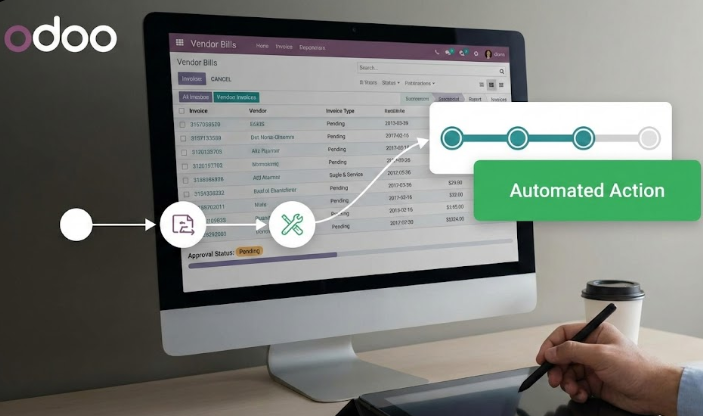
Invoice approval automation means Odoo controls the approval process for you.
Instead of people remembering what to do, Odoo follows rules.
These rules decide:
- Who approves the invoice
- When approval is needed
- What happens after approval
Everything happens inside one system, without chasing anyone.
How Odoo Accounting Automates Invoice Approvals
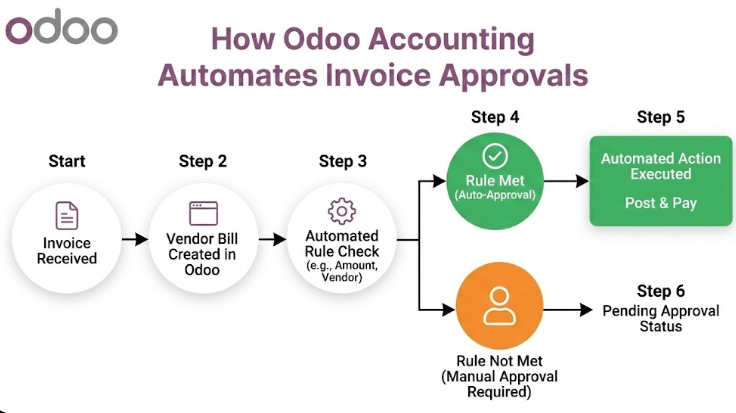
1. Smart Approval Rules
Odoo allows you to create approval rules based on your business needs.
For example:
- Small invoices can auto-approve
- Large invoices need manager approval
- Very large invoices need CFO approval
You can set rules based on:
- Invoice amount
- Vendor type
- Department
- Project or cost center
Once rules are set, Odoo follows them automatically.
2. Multi-Level Approval Workflow
Many businesses need more than one approval.
Odoo supports multi-level approvals, such as:
- Employee → Manager → Finance Head
- Purchase Team → Accounts → Director
Each person gets notified at the right time.
No confusion. No skipped steps.
3. Automatic Notifications and Reminders
One of the biggest benefits of Odoo is automatic communication.
When an invoice needs approval:
- Odoo sends a notification
- Email alerts are triggered
- Reminders are sent if approval is delayed
No more follow-up calls or messages.
4. Real-Time Approval Status Tracking
Finance teams can see everything at a glance.
In Odoo, you can instantly check:
- Which invoices are pending
- Who needs to approve
- How long has an invoice been waiting
This visibility enables teams to act quickly and maintain control.
5. Mobile Approvals for Faster Decisions
Approvers don’t need to be at their desk.
With Odoo’s mobile app:
- Managers can approve invoices on their phone
- CFOs can review payments while traveling
- Decisions happen in minutes, not days
This feature alone saves a lot of time.
New and Updated Odoo Accounting Features (Latest Improvements)
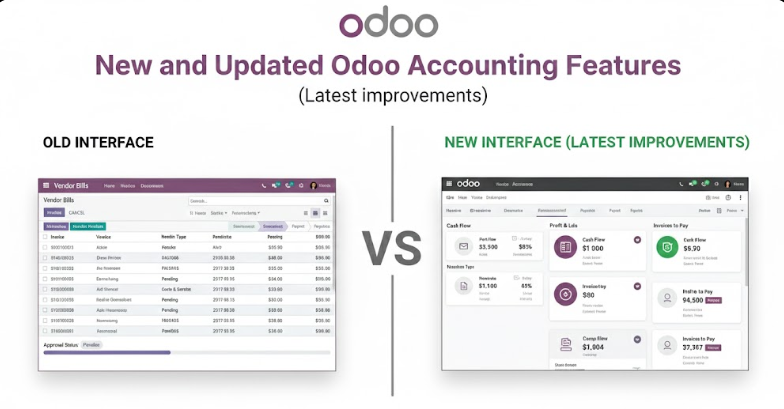
Odoo Accounting keeps getting better. Some of the latest and most useful features include:
AI-Powered Data Entry
Odoo can read invoices automatically using AI and OCR.
It fills vendor name, amount, and taxes with minimal manual effort.
Vendor Bill Automation
Bills can be created from:
- Email attachments
- Scanned documents
- Purchase orders
This reduces data entry errors.
Approval History and Audit Trail
Every action is recorded:
- Who approved
- When it was approved
- What changes were made
This helps with audits and compliance.
Seamless Integration with Payments
Once approved, invoices can:
- Move directly to payment
- Sync with bank accounts
- Update cash flow reports automatically
No duplicate work.
How Approval Automation Cuts Processing Time by Half
Let’s compare.
Manual Process:
- Invoice creation: 1 day
- Approval chasing: 3–5 days
- Errors and corrections: 1–2 days
Total time: 5–8 days
Odoo Automated Process:
- Invoice capture: Same day
- Auto-routing for approval: Immediate
- One-click approval: Minutes
Total time: 2–3 days or less
That is how Odoo cuts processing time by nearly 50% or more.
Benefits for Finance Teams and Business Owners
For Finance Teams:
- Less manual work
- Fewer errors
- Better control
- More time for analysis and planning
For Managers:
- Faster approvals
- Clear visibility
- Mobile access
- No inbox overload
For Business Owners:
- Faster payments
- Better vendor relationships
- Strong internal controls
- Improved cash flow
Real-Life Example (Simple Scenario)
A growing company processes 300 invoices per month.
Before Odoo:
- Approvals took 6 days
- Vendors complained about delays
- The finance team worked overtime
After Odoo:
- Approvals completed in 2 days
- Vendors paid on time
- The finance team focused on reporting and strategy
Same team. Same business. Better system.
Why Odoo Is Better Than Email-Based Approvals
Emails are not systems.
They don’t:
- Track approval stages
- Enforce rules
- Provide audit logs
- Scale with growth
Odoo is built for growing businesses that want control without complexity.
Conclusion: Stop Chasing Approvals — Let Odoo Handle Them
Invoice approvals should not slow your business down.
If your team is still:
- Sending reminder emails
- Calling managers for approvals
- Manually tracking invoices in spreadsheets
It’s time for a change.
Odoo Accounting streamlines invoice approvals into a seamless, automated process.
No delays. No confusion. No approval hell.
Stop chasing approvals — let Odoo handle them, so your finance team can focus on what truly matters: growing the business.
1. What is invoice approval in Odoo?
Invoice approval in Odoo is an automated process where vendor bills are reviewed and approved based on predefined rules. Odoo ensures the right person approves the invoice at the right time.
2. Can Odoo handle multi-level invoice approvals?
Yes. Odoo supports multi-level approvals such as Manager → Finance → Director. Each level is triggered automatically based on invoice value, department, or rules you define.
3. Can approvals be done on mobile?
Yes. Managers and finance heads can approve invoices using the Odoo mobile app from anywhere, reducing delays caused by travel or busy schedules.
4. How does Odoo reduce approval delays?
Odoo sends automatic notifications and reminders, tracks approval status in real time, and removes manual follow-ups like emails or phone calls.
5. Is there an audit trail for approvals?
Yes. Odoo records who approved the invoice, when it was approved, and what changes were made. This is useful for audits and compliance.




Post Comment